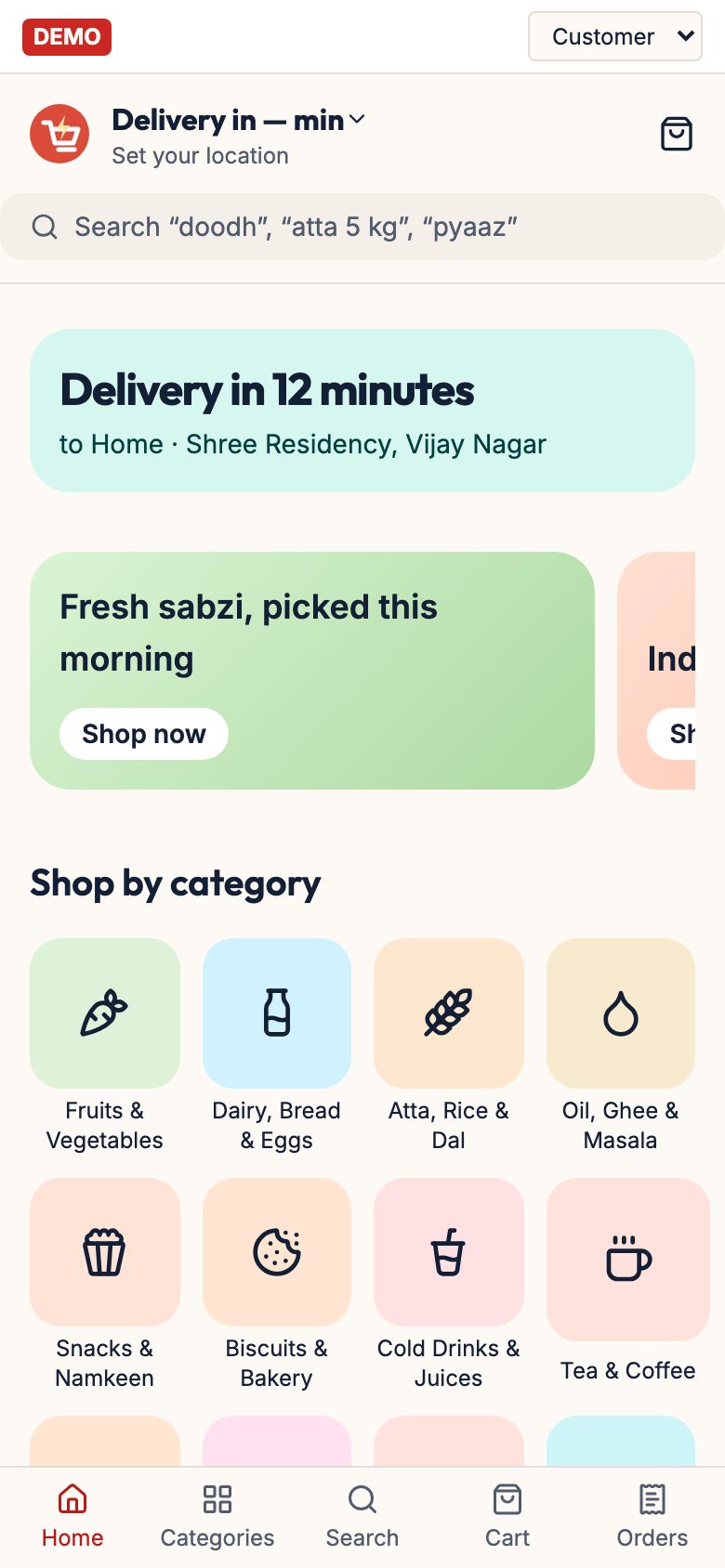
A supermarket needs one thing first: a GST-ready billing and POS system with barcode scanning that also tracks stock. Spreadsheets cannot keep up with thousands of items and hundreds of bills a day, so start with an off-the-shelf retail billing package, and add loyalty, supplier ledger and delivery as they become necessary.
Custom software only pays when your process truly differs, for example a delivery operation with pickers by aisle, a multi-store chain or a loyalty scheme tied to your catalogue. Prices below are broad estimates; get current quotes, as vendors change plans often.
What the store must be able to do on day one
- Scan, bill and print in seconds. Barcode lookup, MRP and selling price, quantity or weight, multiple payment modes (cash, card, UPI) in one bill, and a fast return or exchange.
- GST-correct invoices. Item-wise GST rate and HSN, B2B invoices with the buyer's GSTIN, credit notes for returns, and reports your CA can use for returns. Read our GST billing software guide.
- Stock in and stock out. Purchase entry against supplier invoices, batch and expiry capture for packaged foods, stock adjustment for damage and theft, and an item-wise stock report.
- Loose and weighed goods. Unit conversions (kg and g, litre and ml, dozen and piece) and scale integration or manual weight entry for produce and bulk staples.
- Cash control. Shift-wise opening and closing cash, role-based logins, and discount and void approvals.
- Daily reports on the owner's phone. Sales by category, top and bottom items, gross margin by supplier, near-expiry list and cash reconciliation.
E-invoicing, GST return formats and thresholds change; confirm with your CA which obligations apply to your turnover and which features your billing software must support. Not tax advice.
Spreadsheet or paper: only for the first weeks of planning
Before opening, a spreadsheet is the right tool for planning: item master, supplier list, opening stock list, planned MRP and margin, and a staff roster. After opening, it fails for billing and for live stock.
| Job | Spreadsheet works? | Why |
|---|---|---|
| Planning the range and margins | Yes | Small, one-off, easy to change |
| Supplier price comparison | Yes, for a few dozen items | Simple lookups |
| Daily billing | No | Too slow, error-prone, no tax-compliant invoice flow |
| Stock and expiry tracking | No | Thousands of items, batches and moves; manual updates drift within days |
| Staff roster and festival leave plan | Yes | Low volume |
Retail billing and POS: the core purchase
Look for retail-focused billing software with a supermarket or grocery mode rather than a generic invoice tool. Typical pricing is per terminal and per year or a one-time licence; vendors differ and I have not verified current plans, so collect written quotes.
| Option type | What it gives you | Typical cost (estimate) | Watch out for |
|---|---|---|---|
| Desktop retail billing packages (Marg, GoFrugal, Busy, Tally-based and similar names are commonly mentioned by retailers) | Barcode POS, GST, stock, expiry, purchase and supplier ledgers, multi-counter | ₹6,000–40,000 per year or one-time licences; hardware extra | Check local support, data export and how updates are charged |
| Cloud POS and retail apps | Phone dashboards, backup, multi-store, sometimes delivery or loyalty add-ons | ₹800–4,000 per month per store (estimate) | Needs internet fall-back; check offline mode |
| Free or low-cost mobile billing apps | Quick invoices and basic stock | ₹0–5,000 per year | Weak on barcode speed, batch and expiry, and multi-counter use |
| Accounting software alone | Books and GST returns | ₹5,000–25,000 per year | Not a POS; pair with a billing system rather than using for the counter |
- Test with your real items. Load 200 items and bill a mixed basket including a weighed vegetable, a loose item and a return.
- Ask for data export. You should be able to take your item master and sales history with you if you switch.
- Check support hours during store hours, including Sundays and festival days.
- Run a parallel week where the old method and the new one record the same sales, before cutting over completely.
Stock, expiry and shrinkage control
Billing software is also an inventory system only if the purchase side is entered properly. The weak link is people, not code: if receiving does not post purchase entries against supplier invoices, the stock report is fiction.
- Purchase entry within a day of delivery, checked against the invoice by the receiving clerk.
- Batch and expiry capture for dairy, packaged foods, baby food and medicines-adjacent items, with a weekly near-expiry report and markdown plan.
- Cycle counts. Count one category per day, highest value first, and post differences as adjustments with a reason code (damage, theft, wrong entry).
- Reorder levels on the top 100 items, with a suggested order list per supplier based on weekly sales.
- Margin by item and supplier. Spot lines that sell but earn almost nothing after schemes and wastage.
- Scheme tracking. Record trade scheme terms so billed prices and purchase prices match what the distributor offered.
Loyalty, WhatsApp and online ordering
Once billing is steady, link customers to bills by phone number (with consent) to see who returns and what they buy. Most retail packages include loyalty points or customer-wise sales; use that before buying a separate loyalty tool.
| Need | Cheapest thing that works | Move on when |
|---|---|---|
| Repeat purchase reminders | WhatsApp Business broadcast list from the POS customer export | Lists exceed a few hundred active customers |
| Order intake | WhatsApp Business catalogue and a picker with a printed list | Orders pass the tens a day and mistakes rise |
| Online store | Billing vendor's add-on or a hosted store with the same item list | Customers ask for live stock, slots and payments |
| Delivery routes | A simple route sheet and a few riders | More than 3 to 4 riders, or missed delivery windows |
Follow our WhatsApp for business apps guide and hyperlocal delivery app guide. If you do store customer phone numbers and addresses, read the DPDP Act checklist.
When custom software pays, and what it covers
Custom software is worth considering when: you run delivery at volume (dozens of orders a day) and need picking and dispatch built around your store's aisles; you operate several stores; your pricing and loyalty rules do not fit any package; or you want your catalogue, stock and orders in one system that you control.
| Custom module | What it does for a supermarket |
|---|---|
| Shopper app or website | Search in English and Indian languages, live stock, slots, UPI payment, reorder of last basket |
| Picker terminal | Pick lists sorted by aisle and by ambient, chilled and frozen, with substitutions and weight adjustments |
| Rider dispatch and proof of delivery | Assign, route, track and capture OTP or photo proof |
| Store-ops dashboard | Live orders, stock-outs, wastage and margin by category |
| Integration with your POS | One item master and one stock figure for store and online |
Expect a custom build to cost many lakhs and months of work; our app development cost guide and app vs website guide will help you plan, and the grocery delivery app page lists what to ask for.
About our concept build and The Saral
Our concept build Zippora, live at zippora.thesaral.com, is a demonstration of the delivery side of a grocery business: a shopper app with vernacular search, a picker view that groups items by aisle and temperature zone, and rider dispatch with delivery proof. It is a concept, not a billing or POS system, and it does not replace GST billing, purchase entry, expiry control or a supplier ledger, which your store needs from the first day.
The Saral builds custom apps and websites for Indian businesses. If your store has outgrown packages and you want delivery, ordering or integrations built around how you work, get in touch or read our grocery delivery app page first.
More on starting a supermarket
- Start hereThe full playbook →Models, licences, startup costs and the steps to your first customer.
- Go deeperWhat to buy →Gondolas, chillers, counters, scales, power backup and opening stock, costed and sequenced.
- Go deeperWho to hire →Store manager to cashiers to fresh staff, in hiring order, with pay ranges and vetting tasks.
- Go deeperGetting customers →Society tie-ups, launch pricing, WhatsApp, Google Maps, loyalty and the first ten households.
- Go deeperFinding suppliers →FMCG distributors, staples, mandi produce, dairy and B2B apps: where to find and how to vet.
Questions people ask
What software does a supermarket need to start?
A retail billing and POS package with barcode scanning, GST invoices, stock and expiry tracking, purchase entry and a supplier ledger. Add a customer or loyalty module once billing is stable. Accounting software and GST returns are separate; your CA may prefer a specific one, so ask before you buy.
Can I run a supermarket on Excel or Tally alone?
Not well. Excel cannot handle fast billing and live stock for thousands of items, and Tally is accounting software, not a counter POS. Use a retail billing package at the counter and let it export to your accounts. Spreadsheets are fine for planning ranges, margins and rosters before you open.
How much does supermarket billing software cost in India?
Roughly ₹6,000–40,000 per year for desktop retail packages, or about ₹800–4,000 a month for cloud systems per store, as estimates. Hardware, training and support can be extra, and prices change. Get written quotes from two or three vendors and test each with your own items before committing.
When should I build my own supermarket app?
When your delivery volume, number of stores or loyalty rules outgrow what a billing vendor's add-on handles, and you can fund and maintain a custom system. Until then, a WhatsApp catalogue and your billing software's online add-on are cheaper and quicker. Plan a maintenance budget too.
Does the software handle expiry dates?
Only if it supports batch and expiry capture and your staff enter them at receiving. Look for a near-expiry report and batch-wise stock in any package you test. The feature is only as good as the receiving routine, so train the stock clerk and check the report weekly.