The short answer
Most Indians are more comfortable in a language other than English. An app in Hindi, Marathi, Tamil, Telugu, Kannada, Bengali or Malayalam can reach riders, shopkeepers, farmers, parents and customers that an English-only app quietly loses.
Doing it well is more than translating strings. Scripts behave differently, text gets longer, people type in mixed languages and many prefer to speak rather than type. This guide covers what to plan for, with examples from our concept builds Zippit and Croprise.
Start with who needs which language
Not every side of a product needs the same languages. Decide per user group:
| User | Typical need | Example |
|---|---|---|
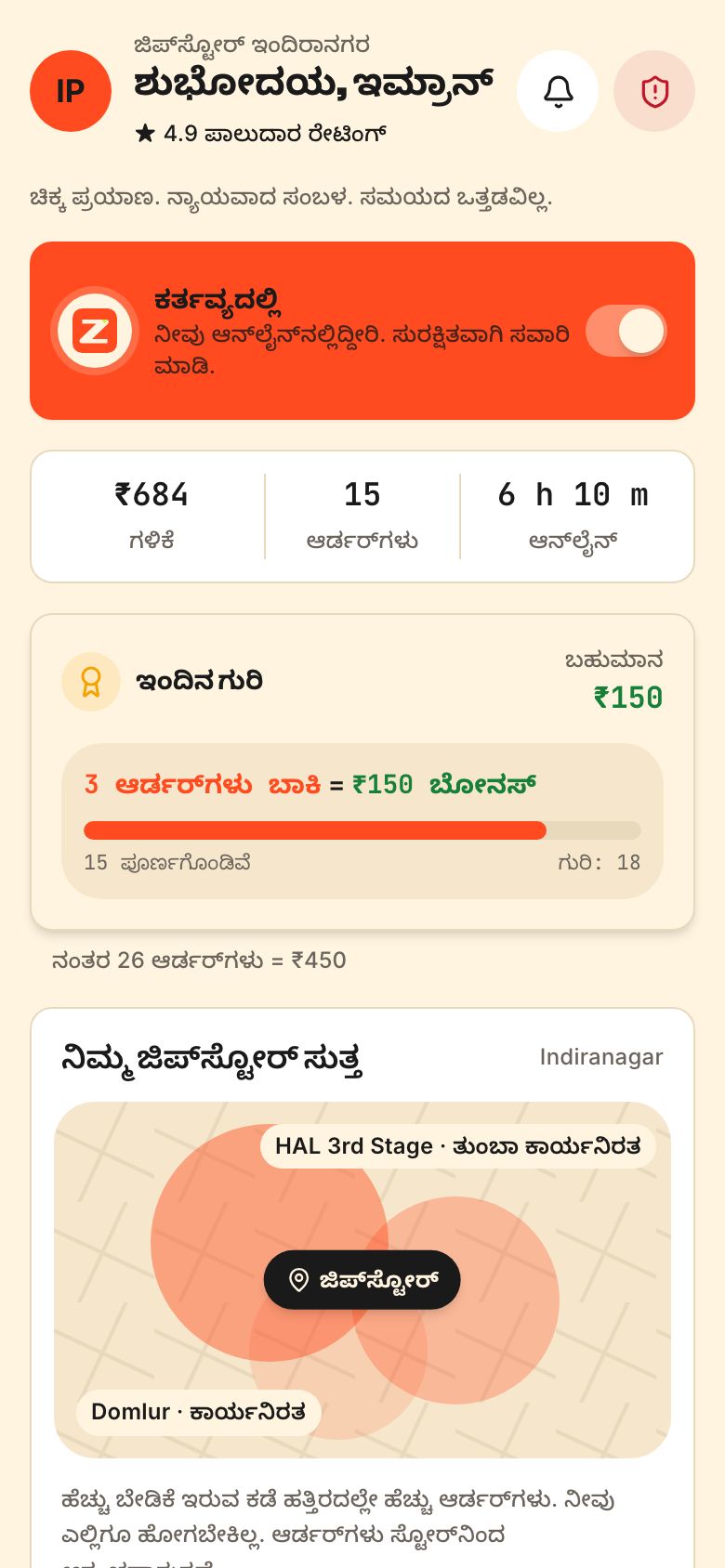
| Riders and delivery partners | Their home language, big buttons, voice prompts | Zippit's rider app runs in Kannada as well as English |
| Shopkeepers and small merchants | Hindi or the state language, simple numbers | Tillbook's billing app |
| Farmers and rural users | Voice-first, icon-heavy, local language | Croprise shows mandi prices in Hindi and Marathi |
| Urban customers | English with an easy language switch | Most consumer apps in metros |
| Parents | Notices and fees in the language they read best | Chalkline's parent app |
A common pattern: an English-first customer app with a language switch, and a partner app that defaults to the local language of the city. A rider app in Bengaluru wants Kannada; in Chennai, Tamil.
Scripts and fonts
Indian scripts — Devanagari, Bengali, Gurmukhi, Gujarati, Odia, Tamil, Telugu, Kannada and Malayalam — have conjuncts and vowel signs that sit above, below and around letters. That has practical effects:
- Use Unicode text everywhere. Never images of text, and never old non-Unicode fonts. Search, copy, screen readers and SEO all depend on it.
- Pick fonts that cover each script properly. Open-source families such as Noto cover all major Indian scripts. Pair a script font with your brand's Latin font and check they sit well together.
- Give lines more height. Marks above and below the line get clipped in tight layouts. Plan a larger line-height for Indian scripts than for English.
- Test real words, not placeholder text. Conjuncts that look fine in one font can break in another.
- Watch font weight and size. Thin weights and small sizes make complex scripts hard to read, especially on budget screens in sunlight.
Layouts that survive longer text
The same label is often longer in Indian languages than in English, sometimes much longer. A button that says “Accept” fits easily; its translation may not.
- Design every component to wrap to two lines rather than truncating.
- Avoid fixed-width buttons and tabs. Let them grow.
- Keep icons next to key actions, so people can recognise them without reading.
- Test each screen in your longest language before you sign off the design.
- Keep strings out of images and illustrations so they can be translated.
Our design system approach — tokens and components built once, in code — makes this testable: switch the language and every screen re-renders. More on that on our services page.
Typing, voice and transliteration
People type in different ways. Many write Hindi in Roman letters (“kal subah 7 baje”), others use their phone's native keyboard, and many prefer to speak.
- Search should match across scripts. A search for “paneer”, “पनीर” and “panir” should find the same dish.
- Support transliteration input where people type names and addresses, so Roman typing can become native script when they want it.
- Offer voice input for search and for long fields. Croprise is voice-first because many farmers would rather speak than type.
- Keep numbers and OTPs in Western digits unless your users clearly prefer native numerals. Most people expect to type 0–9.
- Let names be stored as entered, in any script, and don't force English-only validation.
Numbers, money and dates
Indian formatting is different from the default in most code libraries, and getting it wrong looks careless.
- Use the Indian grouping for numbers: 1,00,000 rather than 100,000. Write large amounts in lakh and crore where your audience expects it.
- Put the ₹ symbol before the amount, and be consistent about paise.
- Show dates as day-month-year, and write month names out where confusion is possible.
- Use 12-hour time with am and pm for most consumer apps.
- Use the platform's locale formatting (for example the en-IN or hi-IN locales) rather than writing your own.
Translation that sounds like a person
Machine translation is a useful first draft. It is not a finished product. Formal, textbook Hindi sounds stiff in an app; everyday Hindi often borrows English words like “order”, “delivery” and “payment”.
- Write a short voice guide for each language: formal or friendly, which English words to keep, and how to address the user.
- Have a native speaker who knows your users review every string in context, on the screen.
- Keep a glossary so “order”, “rider” and “refund” are translated the same way everywhere.
- Handle plurals and gender with proper message formatting, not string concatenation.
- Translate notifications, SMS, WhatsApp templates and the privacy notice too. Under the DPDP Act, notices should be available in Indian languages — see our DPDP checklist.
Plan languages in the first sprint, not after launch. Retrofitting a second script into an English-only design usually means redesigning many screens.
Designing for first-time smartphone users
Language is often only half the barrier. Many people using a rider, farmer or shopkeeper app are confident on WhatsApp and video, but less used to forms, menus and settings. A few habits help everyone, not just first-time users:
- One main action per screen. A big, clearly coloured button for the next step, and everything else quieter.
- Icons and pictures with every label. A photo of tomatoes next to “टमाटर” is understood faster than either alone.
- Read-aloud for key information. Let people tap a speaker icon to hear prices, instructions or an order summary.
- Confirm in words and sound. A clear tone and a spoken “Order accepted” when something important happens.
- Forgiving forms. Accept phone numbers with or without +91 and spaces, and pick from lists instead of typing where possible.
- Short videos for onboarding in the user's language, rather than long text tutorials.
Test with real users in the field, not just in the office. Half an hour watching five riders or shopkeepers use the app in their own language will show you more than a week of internal reviews. We build that into our process before the main build starts.
Where to go from here
See regional languages working in real builds: Zippit's Kannada rider app, Croprise's voice-first farmer app and the agritech app page. If your product needs to reach Bharat beyond the metros, send us your brief and tell us which languages your users speak.
Questions people ask
Which Indian languages should my app support first?
Start with the languages your users actually speak, side by side. A national consumer app often begins with English and Hindi. A partner or rider app should default to the local language of each city, such as Kannada in Bengaluru or Tamil in Chennai. Add languages where usage data or your operations team show real demand.
Is machine translation good enough for app translation?
Machine translation is a good first draft but rarely good enough to ship. It often produces formal phrasing that feels stiff, and it misses context like button length and tone. Have a native speaker who knows your users review every string on the actual screen, and keep a glossary so key words are translated consistently.
How do I make search work when users type Hindi in English letters?
Build search that matches across scripts and spellings. Store common transliterations for products and places, normalise spellings, and index both the native-script and Roman forms. That way “paneer”, “panir” and the Devanagari spelling all return the same result. Voice search helps too, especially for users who are less comfortable typing.
Does supporting regional languages slow down the app?
Not noticeably if it is planned well. The main costs are font files and translation files. Load only the fonts and strings for the selected language, subset fonts where possible, and cache them. A well-built multilingual app can stay light enough for budget Android phones on mobile data.