The short answer
A daily subscription app is a calendar, a wallet and a route sheet, wrapped in a promise: it will be at the door before you wake up. Customers care about three things — easy changes before a cut-off, a bill they understand, and deliveries that don't miss. Your team cares about knowing exactly what to procure and pack tonight.
This guide covers the customer app, the vendor console and the delivery screen for milk, tiffin and daily essentials, using our concept builds Milkrun and Milvara as worked examples.
Three apps, one morning
| Who | What they do | In our builds |
|---|---|---|
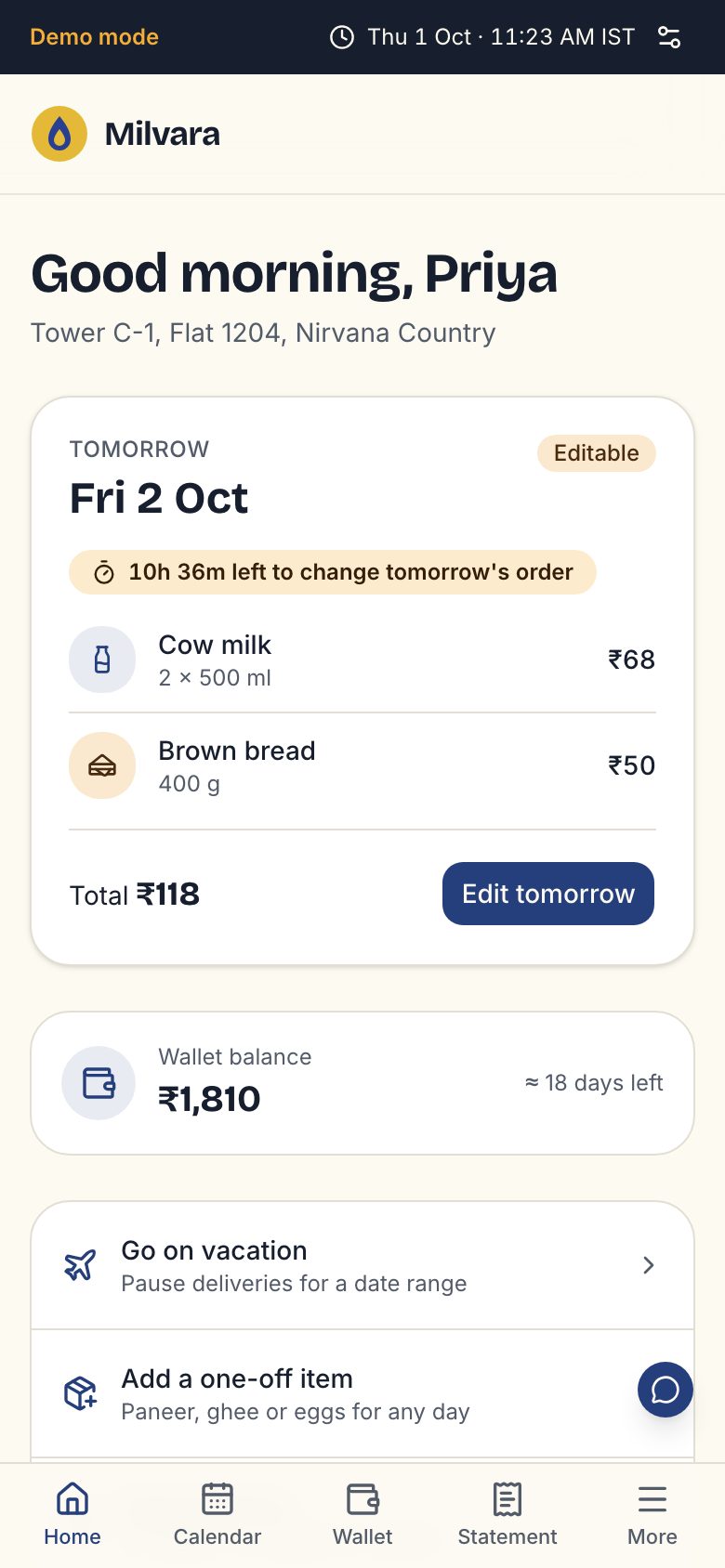
| Customer | Set a daily plan, change tomorrow, pause for travel, top up, read the statement | Milvara's tomorrow card with a cut-off countdown and a week strip |
| Owner or vendor | See tomorrow's households, litres and low balances; plan procurement | Milvara's dairy console with households, litres, revenue and a procurement table |
| Delivery agent | Follow stops in route order, mark delivered or not, with a reason | Milvara's route screen with a reason picker |
Our subscription delivery app page lists every side we build.
The cut-off rule is the heart of the product
Every daily delivery business has a moment after which tomorrow is locked: milk is ordered, tiffins are cooked, routes are printed. Make that rule visible everywhere.
- Show the cut-off time and a countdown on the home screen.
- Let customers change quantity, skip or add items freely before it.
- After it, explain clearly that tomorrow is locked and what they can still change.
- Handle edge cases in the rules engine: a pause that starts during the cut-off window, a holiday, a public strike day.
Milvara uses a night-time cut-off and explains its rules engine, mid-cut-off pauses and ledger on a How it works page. Writing rules down for customers forces you to make them consistent for the code too.
Calendars, pause and skip
Subscriptions fail when changing them is harder than cancelling them.
- A month calendar where each day shows its status: delivered, skipped, paused, upcoming.
- Vacation mode: pick a date range and see which days are already locked.
- One-tap skip for tomorrow, and an easy way to add extra for guests or festivals.
- Different plans for different days: more milk on weekends, no tiffin on Sundays.
- Reminders before a pause ends, so the first delivery back isn't a surprise.
Billing: wallets, postpaid and UPI AutoPay
Daily deliveries mean many small charges. How you bill shapes cash flow and trust.
| Model | How it works | Good for |
|---|---|---|
| Prepaid wallet | Customer tops up; each delivery deducts | Predictable cash flow; easy pause and skip |
| Monthly postpaid | Bill at month end for what was delivered | Familiar for families used to paying the milkman monthly |
| UPI AutoPay | Customer approves a mandate; you charge on a schedule | Fewer missed payments, less chasing |
- Show a statement that explains every charge, line by line — Milvara's tagline is “billed to the paisa”.
- Warn early when the wallet balance is low, and show the owner a list of low balances for tomorrow.
- With UPI AutoPay mandates, customers approve once and get a notification before each debit; make the amount and date clear in the app too.
Read adding UPI payments to your app for how mandates, refunds and reconciliation fit together.
Wallets and recurring payments involve rules from payment regulators and your gateway. Use a regulated payment partner and confirm what applies to your setup with them and your CA.
The vendor console and route sheet
At night, the owner needs one screen that answers: how much to procure, how much to pack, which routes go out, and who might not pay.
- Tomorrow's totals by product: litres of toned milk, curd cups, tiffins by menu.
- Households by route and stop order, with notes like “ring once” or “leave at the gate”.
- Paused and new customers highlighted so nobody is missed or double-served.
- A delivery screen for agents that works on a basic Android phone with weak data, marking delivered or not delivered with a reason.
- A morning summary of missed deliveries so refunds or credits happen automatically.
For businesses that also deliver on demand, our hyperlocal delivery guide covers riders and live tracking.
Tiffin and meal subscriptions
Tiffin services follow the same pattern with a few differences.
- A weekly menu customers can see in advance, with veg and Jain options where relevant.
- Per-meal choices before the cut-off: lunch only, dinner only, extra roti.
- Kitchen counts by dish and packing slips by route.
- Clear labels for allergens and spice level.
If you also sell meals on demand, compare this with a food delivery app; many kitchens run both.
Brand and the doorstep moment
A subscription brand lives at the door every morning. Milkrun's glass bottles, crates and doorstep bag, and Milvara's stamped caps, are part of the product. So is the morning notification: one calm line saying it's delivered.
Start in a few societies or one area where routes are dense, so each agent covers many homes quickly. Then expand route by route. Our Pune and Bengaluru pages talk about launching in dense residential areas.
Retention: why subscribers leave, and how to keep them
Subscription businesses grow by keeping customers, not only by adding them. The usual reasons people cancel are practical, and most can be designed out.
| Reason people leave | What helps |
|---|---|
| A missed or late delivery | Proactive message and automatic credit, not a complaint they have to raise |
| A bill they don't understand | A line-by-line statement and a clear wallet ledger |
| Changing plans is a hassle | Skip, pause and add before the cut-off in one or two taps |
| Quality slipped once | An easy way to report it with a photo, and a visible fix |
| Moving house | Address change in the app, and a quick check whether the new area is served |
If you're planning a subscription business, send a brief. We'll walk you through the Milkrun and Milvara builds on a call and send a fixed quote within 48 hours.
Questions people ask
How do milk subscription apps work?
Customers set a daily plan, change tomorrow's order before a nightly cut-off, pause for travel and pay through a wallet, monthly bill or UPI AutoPay. Behind the app, a vendor console totals tomorrow's orders for procurement and packing, and delivery agents follow a route sheet and mark each stop delivered or missed.
Should a subscription app use a wallet or monthly billing?
A prepaid wallet gives you predictable cash flow and makes pause and skip simple. Monthly postpaid feels familiar to many families. Many businesses offer both, with UPI AutoPay for automatic top-ups. Whatever you choose, show a clear statement that explains every charge, because billing confusion is a common reason people cancel.
How long does it take to build a subscription delivery app?
A first version with the customer app, vendor console and delivery screen usually takes around 6–10 weeks, depending on billing options, the number of products and how complex your routes are. A two-week concept sprint can produce a clickable prototype to test with a few societies before the full build.
Can delivery agents use the app on basic phones?
They should be able to. Keep the agent screen simple — a list of stops in order with large buttons — save actions offline when data drops, and sync later. Use the language agents read comfortably. Testing on the actual phones your agents carry matters more than any feature.